Chat to edit a photo — pick GPT Image 2, Nano Banana, or Seedream by task | ChatImg

3-second answer: Open ChatImg, upload a photo, type the change. Try GPT Image 2 for a finished layout, Nano Banana for text-in-image, Seedream when the picture has to look current. Do the task first — restore an old print, cut out the background, or X-ray the photo — then pick the model that wins that job.
The “one model to rule them all” era is over. ChatImg puts the models in one chat box so you can run the same photo through more than one instead of collecting vs-listicles. The table below is a 30-second cheat sheet; the rest of this page is hands-on, then a task map.
Overview: 7 Models at a Glance
| Model | Maker | Best at | Speed | 4K | Price tier |
|---|---|---|---|---|---|
| GPT-Image-2 | OpenAI | Complex scene reasoning + text | Slower | Experimental | High |
| Nano Banana Pro | Text rendering + multi-image fusion | Slower | ✅ Native | High | |
| Nano Banana 2 | Value + rapid iteration | ⚡ 4–6 sec | ✅ | Mid | |
| Seedream 5 | ByteDance | Web-aware timely images + intent understanding | Mid | High-res | Low |
| FLUX.1 Kontext | Black Forest Labs | Instruction-based image editing | Fast | ~2MP | Mid (Dev open-source) |
| Qwen Image Edit | Alibaba | Chinese text-in-image editing | Mid | ✅ 4096px | Open-source, free |
| Z-Image Turbo | Alibaba Tongyi | Ultra-fast photorealistic output | ⚡ Sub-second | ✘ | Open-source, free |
The iron rule: there is no “best model,” only the best model for this job. On ChatImg, start from the task (restore / cutout / X-ray / poster text), then swap GPT Image 2, Nano Banana, or Seedream on the same photo.
Breaking Down All 7 Models
GPT-Image-2 (OpenAI)
OpenAI’s next-gen image model, released in April 2026, is its first to bring “thinking” into the generation flow — when faced with a complex scene description, it “thinks” before it draws, which raises the success rate for complex compositions. Reliable text rendering and seamless integration with the ChatGPT workflow are its strengths.
The trade-off is that it’s slow and expensive: the reasoning process makes it slower than pure speed-focused models, the per-image cost at high quality is noticeably higher, and truly stable 4K is still experimental. It’s a fit for high-quality final deliverables that need complex scene planning, not for mass draft iteration.
Nano Banana Pro (Google, Gemini 3 Pro Image)
If your top priority is “don’t let the text in the image come out wrong,” this is the current benchmark. Google’s official figures put the multilingual error rate for single-line text rendering below 10% in most cases, far ahead of contemporaneous rivals (Google DeepMind official page). It supports 4K natively, can fuse up to 14 input images into one, and keeps up to 5 people consistent — a powerhouse for posters, infographics, and brand assets.
Its weakness is also slow and expensive: it sacrifices speed for quality, and the per-image cost at 4K runs high.
Nano Banana 2 (Google, Gemini 3.1 Flash Image)
Released in February 2026, this is the “speed-and-value edition” of the Nano Banana family. Built on Gemini 3.1 Flash Image (not the original 2.5 Flash), it generates in about 4–6 seconds — roughly 4x faster than Pro — at about half the price, and in some public benchmarks its quality even edges out Pro (The Batch report).
It’s the sweet spot for “need to revise repeatedly, through many versions” scenarios: marketing assets, product shots, storyboard drafts. Its weakness is that long paragraphs of text and non-Latin characters are still weaker than Pro.
Seedream 5 (ByteDance)
ByteDance’s unified multimodal model, released in February 2026, with its biggest highlight being built-in web search + deep reasoning — it can “look it up before drawing” for images tied to current events and trending topics. Pricing is friendly (the lightweight tier is about $0.035 per image), and both intent understanding and multi-reference control are solid. Worth noting: official disclosures on some specs of the full version are limited, so go by hands-on testing.
FLUX.1 Kontext (Black Forest Labs)
Note its official name is FLUX.1 Kontext (pro / max / dev tiers). Its headline isn’t generation from scratch but instruction-based image editing: give it an image plus one sentence, and it understands and edits — no fine-tuning needed. Character/IP consistency, sequential editing, and editing text within an image are its strengths, and the Dev tier also releases open weights for local deployment.
Editing-specific reminder: FLUX.1 Kontext tends to accumulate artifacts after about 6 consecutive edits. When refining, “save key steps separately” rather than editing endlessly down a single chain.
Qwen Image Edit (Alibaba)
The image-editing model from Alibaba’s Qwen team is Apache 2.0 open-source with free weights, and its latest version (2511) substantially improves character consistency. It inherits Qwen-Image’s signature skill — editing text within images in both Chinese and English — and can precisely alter Chinese characters in an image, a weak spot for most overseas models. It supports up to 4096px, making it a fit for Chinese text-and-image work and pipelines that need controllable deployment or LoRA customization.
Newer Qwen tiers on ChatImg: besides Qwen Image Edit, the model list now has Qwen Image 3.0 / 3.0 Pro for dense text-and-image layouts such as menus, newspapers, and posters, Qwen Image 2.1 for native transparent layers, and Qwen Image 2.1 Turbo / Pro when you want an edit back in about 20–35 seconds. All of them take an uploaded photo plus a one-sentence instruction.
Z-Image Turbo (Alibaba Tongyi)
It has only 6B parameters yet goes toe-to-toe with larger models, and its fiercest edge is speed: 8-step inference, sub-second output, and it can run locally on a 16GB consumer GPU under bf16 — also Apache 2.0 open-source and free. It’s strong at photorealistic portraits and supports both Chinese and English text. The trade-off is a resolution ceiling of about 1K (no 4K), lower generation diversity (a concession made for speed), and the model itself only does text-to-image, not editing.
The money-saving principle: use the fast and cheap ones (Z-Image Turbo, Nano Banana 2) for drafts and mass iteration, then bring in the expensive ones (Nano Banana Pro, GPT-Image-2) for the final deliverable and commercial use. Spend the money on the last image.
Multi-Dimensional Head-to-Head
Mapping the feel above onto concrete dimensions makes decisions easier:
| Dimension | Top tier | Notes |
|---|---|---|
| Text rendering | Nano Banana Pro > Qwen / Z-Image (Chinese) | Pick Pro first for posters, logos, text-in-image; Qwen is steadier for Chinese caption images |
| Image editing | FLUX.1 Kontext / Qwen / GPT-Image-2 | Choose Kontext for instruction editing and character retention; Qwen for Chinese editing |
| Multi-image fusion | Nano Banana Pro (14 images / 5 people) | Group shots, multi-reference brand assets |
| Generation speed | Z-Image Turbo (sub-second) > Nano Banana 2 (4–6s) | Mass iteration, real-time preview |
| Value for money | Nano Banana 2 / Seedream 5 / the two open-source siblings | High-frequency output on a budget |
| 4K HD | Nano Banana Pro / Nano Banana 2 / Qwen | Print, large-format output |
| Local deployment | Z-Image Turbo / Qwen / FLUX Dev | Data-sensitive, want to self-host |
Hands-On Test: One Prompt, Five Models
Specs only tell you so much; results tell you more. We fed the same prompt to 5 mainstream text-to-image models, focusing on image quality and the rendering of the in-image text “CHATIMG”:
Prompt:
A cinematic movie poster, a cute orange cat astronaut floating in space, bold title text "CHATIMG" at the top, neon cyberpunk style, ultra detailed
Nano Banana Pro (Google)
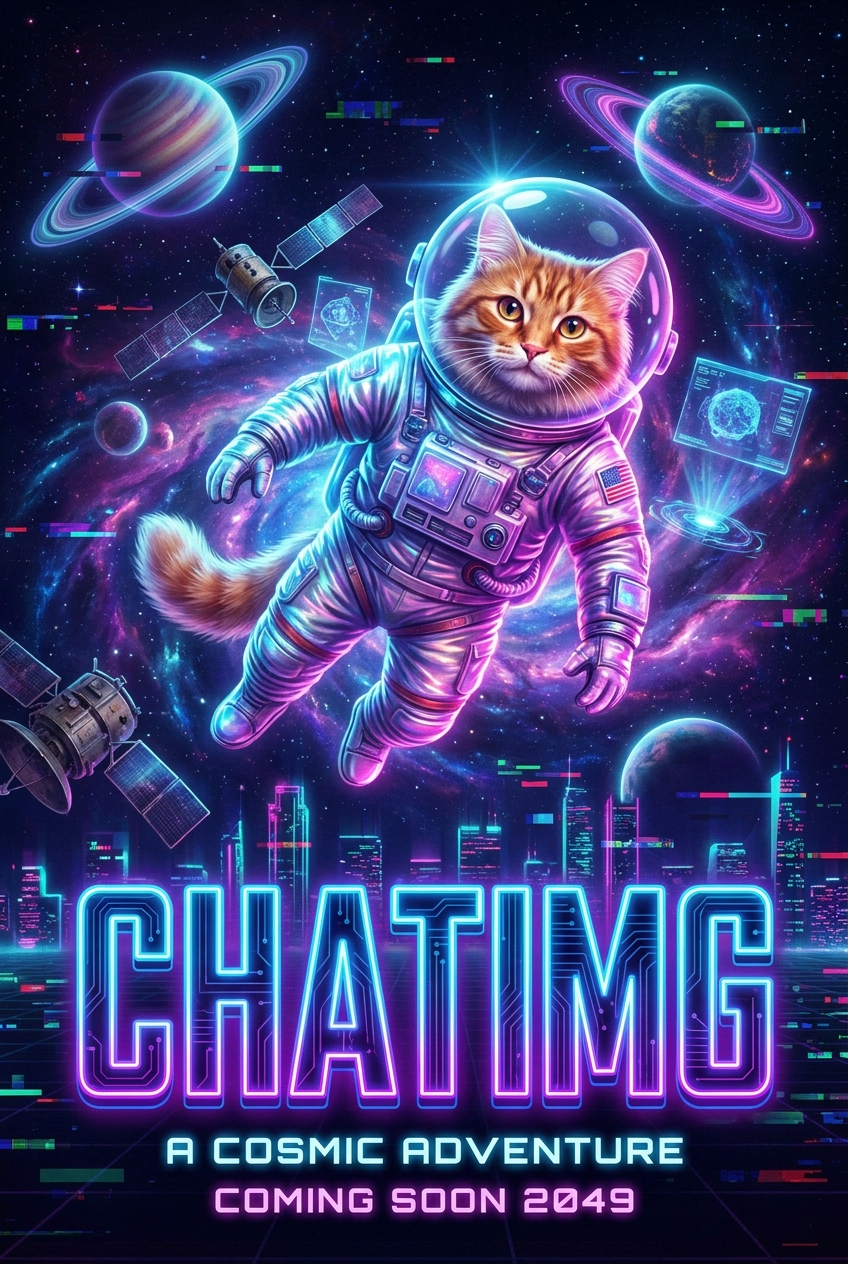
The dual benchmark of this test for both image quality and text rendering — the neon look is dialed all the way up, and even the subtitle “A COSMIC ADVENTURE / COMING SOON 2049” is rendered cleanly and accurately, with extremely rich detail in the fur, spacesuit, planetary rings, and city skyline. Text rendering is Google’s signature strength, and it lives up to the reputation.
Nano Banana 2 (Google)
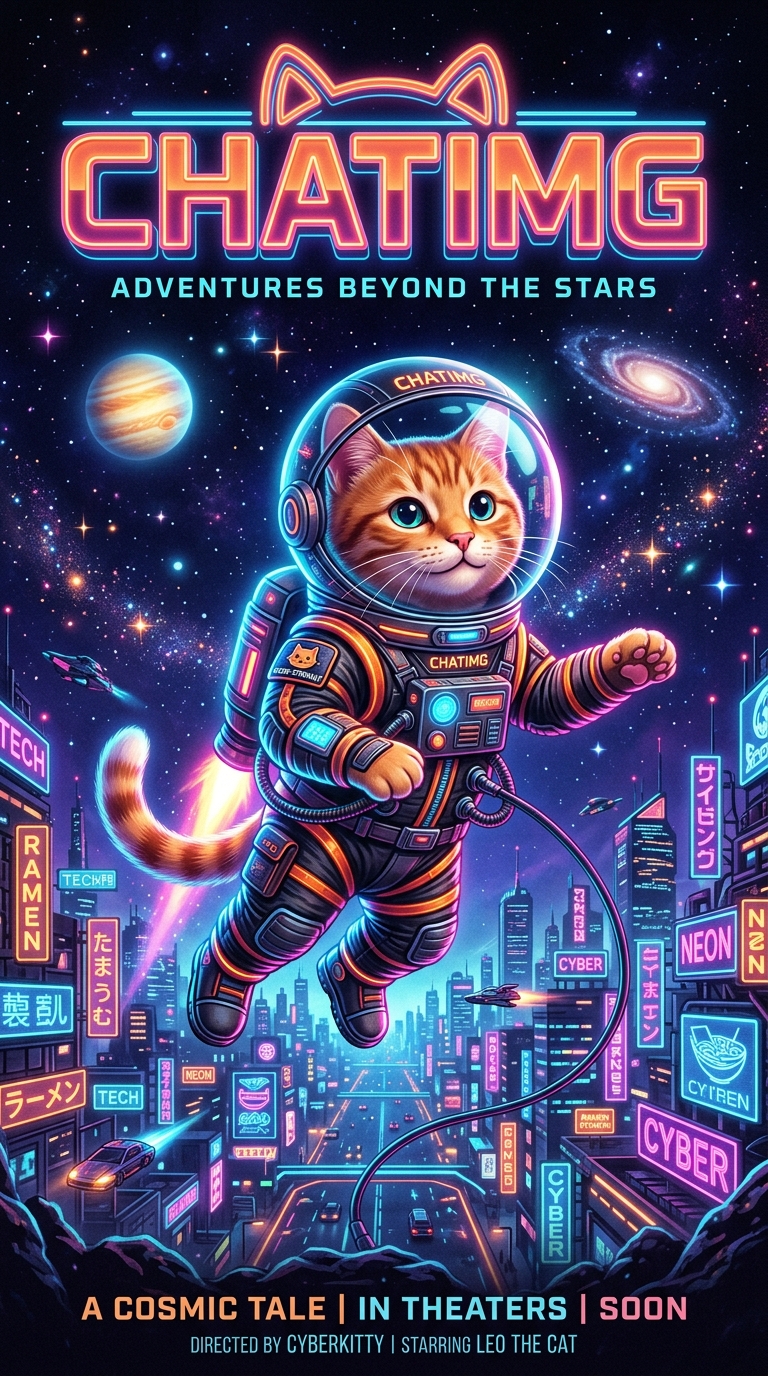
The image with the richest text of the bunch — title, subtitle, bottom credits, and city neon signage stacked layer upon layer, all rendered well. Quality is close to Pro, yet it’s about 4x faster at roughly half the price — astonishing value.
GPT-Image-2 (OpenAI)
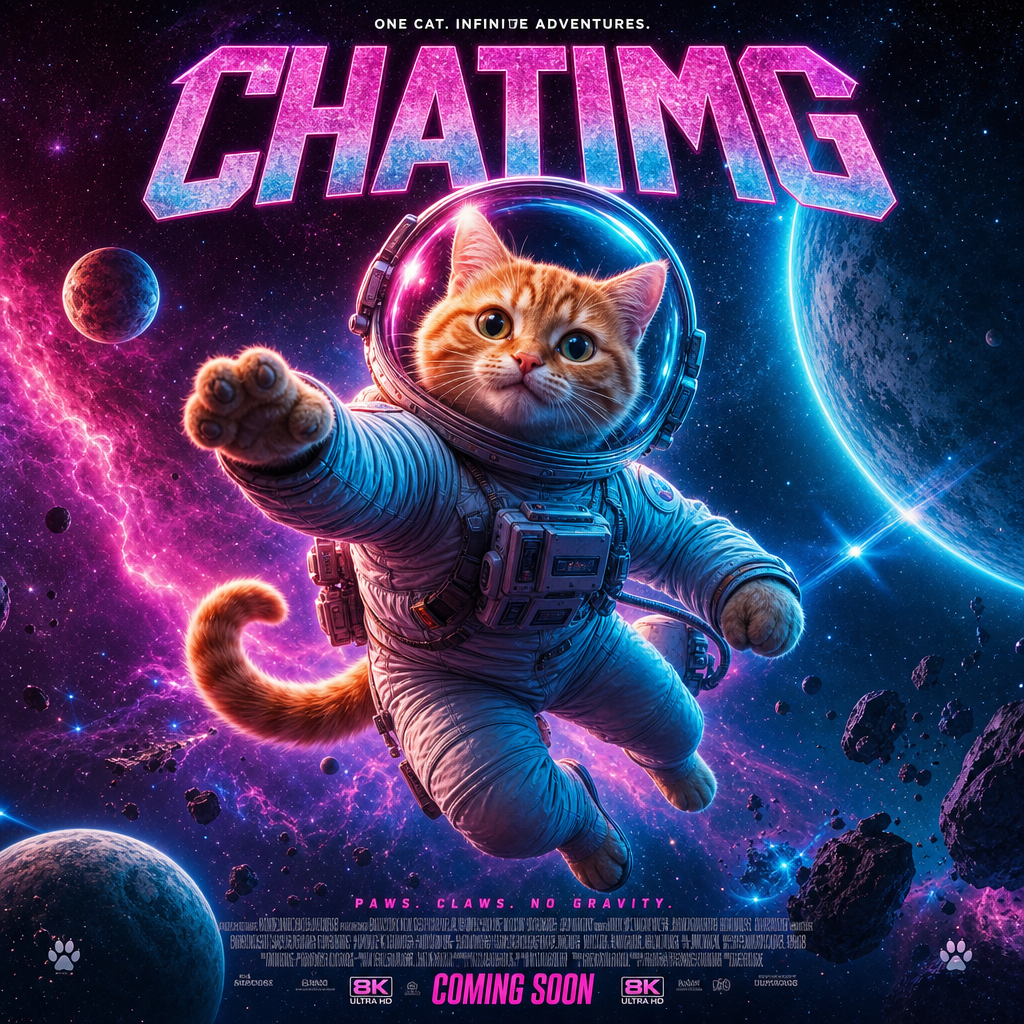
A complete movie-poster layout — big title, subtitle, multiple lines of small text at the bottom, all present, with a clean “CHATIMG” typeface. Text rendering and complex layout are its strengths; it can almost be used as a finished poster as-is.
Seedream 5 (ByteDance)
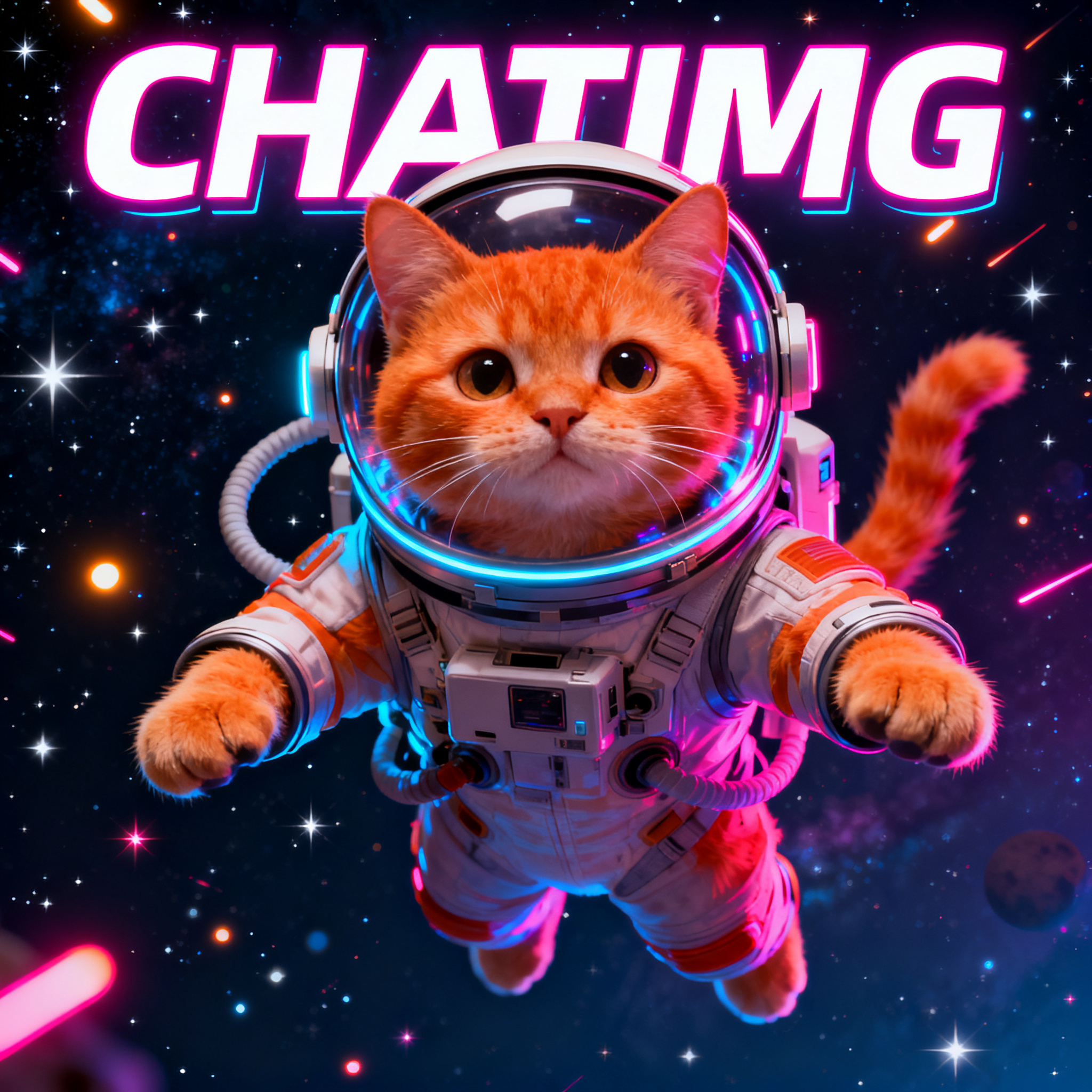
The highest-resolution image in this test (2048×2048), with an accurately rendered neon title and a photorealistic, cute orange cat. The image quality holds up well, making it a fit for scenarios that need high-resolution output.
Z-Image Turbo (Alibaba Tongyi)
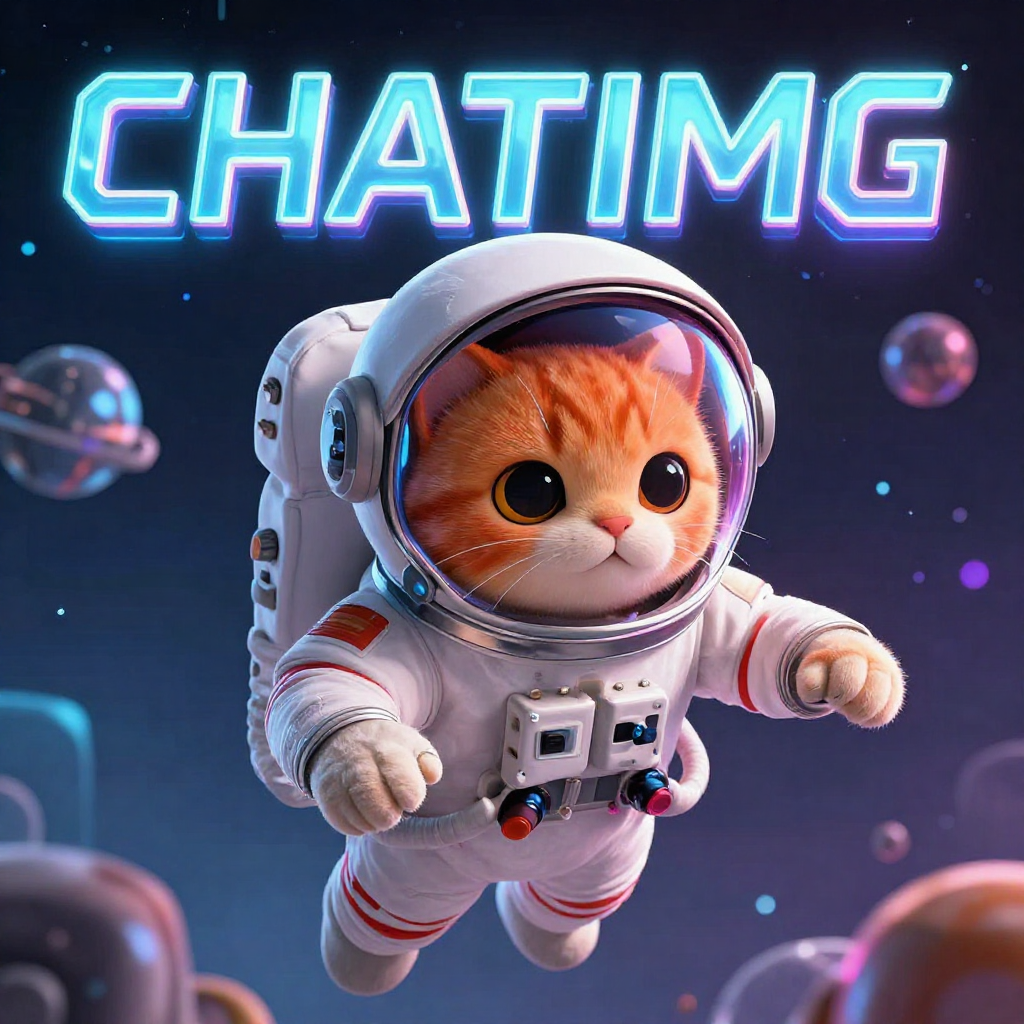
A 3D cartoon texture, with the title rendered just as accurately. What’s genuinely impressive: it has only 6 billion parameters, outputs in sub-second time, and runs locally on a consumer GPU — that quality is exceptional value for an “ultra-fast small model.”
All five rendered the title text accurately, but each has its own focus: Nano Banana Pro is the strongest on both quality and text, Nano Banana 2 offers compelling value, GPT-Image-2 looks like a finished layout, Seedream wins on resolution, and Z-Image Turbo delivers a surprise with its tiny footprint and blazing speed. This is exactly “pick the scene, not the model” — go to Nano Banana for text posters, GPT-Image-2 for a finished layout, Seedream for high resolution, and Z-Image Turbo for fast and cheap.
In ChatIMG you can feed the same sentence to every model yourself and compare to pick the best result.
Which Should You Pick for Each Scenario?
| What you want to do | Recommended model | Why |
|---|---|---|
| Social media / cover image (with title text) | Nano Banana Pro | Most accurate text rendering |
| Mass output, repeatedly trying styles | Nano Banana 2 / Z-Image Turbo | Fast + cheap |
| Refining one image repeatedly while keeping the character consistent | FLUX.1 Kontext | Character consistency + sequential editing |
| Editing Chinese text in an image | Qwen Image Edit | Strong at Chinese text-in-image editing |
| Complex scenes that need “think it through before drawing” | GPT-Image-2 | Reasoning-driven |
| Riding a trend, needing timely information in the image | Seedream 5 | Built-in web search |
| Data-sensitive, want to run locally | Z-Image Turbo / Qwen | Open-source, free, self-deployable |
A vs-directory does not tell you which button to press. Do the task first, then swap models in ChatImg:
| What you want to do | Open this | Then try |
|---|---|---|
| Restore a faded print | AI photo restoration | GPT Image 2 for a finished layout |
| Cut the subject out | Transparent background maker | GPT Image 2 sprite / cutout prompt |
| See the structure under a photo | X-ray vision | GPT Image 2 in the same chat |
| Poster or UI with readable type | GPT Image 2 landing | GPT Image 2, then Nano Banana Pro if type still slips |
The actual pain is “seven sites, seven wallets, seven UIs.” ChatImg is one chat box: paste the prompt, swap GPT Image 2 / Nano Banana / Seedream on the same photo, keep the winner. Free daily trial — you do not need seven memberships to compare.
Frequently Asked Questions (FAQ)
Q: What is ChatImg for, if I already have a favorite model? A: ChatImg is the chat box where you edit a photo and then pick. Upload, describe the change, run GPT Image 2 / Nano Banana / Seedream on the same file. The model list is what you can choose in the product — not a ranking you have to memorize.
Q: Which model should I start with on ChatImg? A: Start from the job. Poster or UI type → GPT Image 2. Text that must stay sharp → Nano Banana Pro. A picture that has to look current → Seedream. Restore / cutout / X-ray → do that task page first, then swap models in ChatImg if you want a second take.
Q: Can I try GPT Image 2 without collecting seven accounts? A: Yes. ChatImg has a free daily trial and GPT Image 2 is in the model picker. Open the GPT Image 2 page or the chat box.
Q: Where do I restore, cut out, or X-ray a photo? A: Restore: AI photo restoration. Cutout: transparent background maker. X-ray: x-ray vision. Each one can send you back into ChatImg chat when you want another pass.
Q: Why isn’t Midjourney on this list? A: This page covers models you can actually run inside ChatImg in one click. Midjourney is a separate subscription; Seedream covers the ByteDance-family look if that is what you wanted from Jimeng.
Conclusion
Pick the job, then pick the model: GPT Image 2 for a finished layout, Nano Banana Pro for type, Seedream when the picture must look current. ChatImg lets you try those on the same photo instead of collecting another vs-table.
Chat to edit a photo in ChatImg
Related Reading
More in this series
- MAI-Image-2.6-Flash vs GPT Image 2: Same-Prompt Bakeoff
- Best Midjourney Alternatives 2026: Ideogram, Krea, and Chat Edit
- MAI-Image-2.5 Local Edit vs Chat: How to Pick in 2026
- Grok Imagine Image 2.0 vs GPT Image 2: Region Edits and Layout Text in 2026
- Adobe Firefly Precision Flow vs. AI Markup: Two New Paradigms for Precise AI Image Editing in 2026
View all 6 articles in Tool Comparisons →